
Best Material Selection Software for Engineers: 2026 Guide


For thermal-focused workflows, the Jewlz Thermalysis Toolkit is the strongest pick for simulation-validated material choices under heat-transfer constraints. For global standards cross-referencing at scale, Total Materia leads on database depth and its weighted Optimizer module. Quick free lookups? MatWeb covers most preliminary design needs at no cost. Here is the full shortlist by job-to-be-done, drawn from the 2026 buyer’s guide landscape for material selection tools:
Best for thermal engineers: Jewlz Thermalysis Toolkit (Jewlz Technologies) — built-in temperature-dependent property data, conduction/convection/radiation workflows, simulation-ready exports
Best overall / Ashby-method workflows: Ansys Granta Selector — interactive Ashby charts, performance-index downselection, deep CAD/CAE integration
Best for large standards cross-referencing: Total Materia — a very large materials database, global standards equivalence, ML-driven property prediction, weighted Optimizer module
Best free/budget lookup: MatWeb — over 180,000 manufacturer datasheets, free property search, no subscription required for basic access
Best for supplier/procurement workflows: Matmatch — side-by-side comparisons, direct supplier connections, procurement-coupled selection
Key Takeaways
The best material selection software for thermal engineers is the Jewlz Thermalysis Toolkit; for Ashby-method trade-offs, Ansys Granta Selector leads; and for database breadth, Total Materia’s 570,000-material database with its Optimizer module is the strongest option.
Point | Details |
Match tool to job-to-be-done | Thermal workflows need temperature-dependent data; standards cross-referencing needs Total Materia’s depth. |
Database provenance matters | Manufacturer-supplied, peer-reviewed, and computed data carry different confidence levels for design decisions. |
Integration drives adoption | A tool that does not connect to your CAD or FEA environment adds friction; verify export formats before signing. |
Free tools cover preliminary work | MatWeb’s 180,000+ datasheets and Materials Project’s open API handle early-stage lookups at no cost. |
Jewlztech for thermal selection | The Thermalysis Toolkit delivers simulation-ready, temperature-dependent material data for heat-transfer workflows. |
Quick next steps:
Shortlist two or three tools based on your primary material class and simulation environment
Run a real part through each trial using actual operating temperatures and material candidates
Verify data provenance for any property value you plan to carry into a final design
Confirm CAD/FEA export formats before committing to a license
Check whether a free tool (MatWeb, Materials Project) covers your preliminary design needs before paying for a subscription
Table of Contents
Which material selection software is right for your project?
How to pick the right material selection software for your team
Why the Jewlz Thermalysis Toolkit works for thermal material selection
When a focused thermal toolkit beats a broad materials platform
The Jewlz Thermalysis Toolkit is ready to run your next thermal case
Which material selection software is right for your project?
Tool | Best for | Pricing / licensing | Platform | Database size & provenance | Supported material classes | CAD / FEA integrations | Ease of use | Data export / API |
Jewlz Thermalysis Toolkit | Thermal engineers needing simulation-validated material choices | Monthly subscription; free tools available | Downloadable Excel-based toolkit | Built-in temperature-dependent property database | Metals, polymers, composites, ceramics (thermal focus) | Excel-native; export-ready for simulation inputs | Compact, fast onboarding; documentation included | Excel export; simulation-ready data formats |
Ansys Granta Selector | Ashby-chart trade-offs and CAD/CAE-integrated selection | Enterprise licensing; demo available | Desktop + CAE plugin (Ansys ecosystem) | Curated, peer-reviewed; large multi-class database | Metals, polymers, composites, ceramics, foams | Ansys Workbench, SolidWorks, NX, CATIA | Steep learning curve; strong documentation | Export to CAD/CAE formats; API available |
Total Materia | Global standards cross-referencing and multi-criteria optimization | Subscription tiers; trial available | Cloud-based | 570,000+ materials; curated, standards-linked | Metals, polymers, composites, ceramics | Limited direct CAD integration; API available | Moderate; Optimizer module adds complexity | API access; data export in multiple formats |
MatWeb | Quick free property lookups for preliminary design | Free (basic); paid tiers for advanced search | Web-based | 180,000+ manufacturer datasheets | Metals, polymers, composites, ceramics | No direct CAD integration | Very easy; minimal setup | Limited export; no public API |
Matmatch | Supplier-connect and procurement-coupled selection | Freemium; supplier-sponsored content | Web-based | Supplier-contributed; growing coverage | Metals, polymers, composites | No direct CAD integration | Easy; comparison-focused UI | Limited API; supplier data export |
Materials Project | Inorganic crystal research, batteries, photovoltaics | Free (open-access) | Web-based + API | Computed DFT data; inorganic crystals focus | Inorganic compounds, ceramics | API-first; no CAD plugin | Technical; research-oriented | Full API access; open data |
Pick by job-to-be-done: Jewlz Thermalysis Toolkit for thermal simulation workflows. Ansys Granta Selector for Ashby-method performance-index selection. Total Materia for global standards cross-referencing. MatWeb for free preliminary lookups. Matmatch for procurement-linked shortlisting. Materials Project for computational research on inorganic candidates.
Pro Tip: Before committing to any platform, run a real part from your current project through the trial. A tool that handles your actual material class and temperature range in under 30 minutes is worth more than a feature checklist that looks good on paper.
Modern material selection tools combine property search with structured decision workflows — Ashby charts, multi-criteria optimization, supplier quote enablement, and CAD/CAE integration — rather than functioning as simple lookup tables.
Short reviews of the top material selection tools
Jewlz Thermalysis Toolkit
The Thermalysis Toolkit is purpose-built for heat-transfer engineering. Its built-in property database covers temperature-dependent data across conduction, convection, and radiation scenarios, which means you are not patching together material properties from a separate source mid-simulation. The Excel-based format keeps the barrier to entry low: download, open, and you are running calculations on the same day.
The limitation is scope. This is a thermal toolkit, not a full PLM-scale materials management platform. If your project requires global standards cross-referencing or Ashby-chart trade-offs across dozens of material classes, you will need a broader tool alongside it. For thermal enclosure design, heat sink material trade-offs, or any workflow where temperature-varying properties drive the decision, it is the fastest path from material candidate to simulation-validated choice.
Pricing: Monthly subscription; free engineering tools available on the Jewlztech site.
Ansys Granta Selector
Granta Selector is the reference standard for Ashby-method selection. Its interactive Ashby charts let you plot performance indices and draw selection boxes directly on material property space, which is genuinely useful when you are trading off specific stiffness against cost or thermal conductivity against density. Integration with the Ansys Workbench ecosystem, SolidWorks, NX, and CATIA makes it a natural fit for teams already running FEA.
The trade-off: enterprise licensing costs are significant, and the learning curve is real. Teams without a dedicated materials engineer may find the full feature set underused. For readers weighing Ansys-ecosystem alternatives, the Ansys alternatives comparison covers the landscape in detail.
Total Materia
Total Materia’s database depth is its clearest differentiator. It offers an extensive number of materials with global standards cross-referencing, enabling finding equivalents across ASTM, DIN, JIS, and ISO in a single query. The Optimizer module normalizes disparate property data, applies user-defined weightings, and outputs a ranked candidate list that can factor in sustainability and supply-chain availability. ML-driven property prediction fills gaps where measured data is sparse.
The cloud-based platform has no direct CAD plugin, so teams that need to push selections directly into a simulation environment will rely on API or manual export. Subscription tiers are available; a trial is offered.
MatWeb
MatWeb is the go-to for quick, free property lookups. It covers a large collection of manufacturer-supplied datasheets for metals, polymers, composites, and ceramics, with built-in unit converters and property search filters. For preliminary design work where you need a ballpark thermal conductivity or tensile strength before committing to a full analysis, it is hard to beat at zero cost.
The ceiling is also clear: no Ashby charts, no optimization module, no CAD integration, and limited export capability. Data provenance is manufacturer-supplied, so independent verification is your responsibility before using values in a final design.
Matmatch
Matmatch sits at the intersection of material discovery and procurement. Its side-by-side comparison UI makes shortlisting fast, and the supplier-connect feature lets you move from a material candidate directly to a quote request. That tight coupling between selection and sourcing is genuinely useful when procurement timelines are part of your constraint set.
Coverage is growing but still supplier-contributed, which means gaps exist for niche or advanced material classes. No direct CAD integration.
Materials Project
The Materials Project is a computational database for inorganic crystals, backed by density functional theory (DFT) calculations. If your work involves batteries, photovoltaics, catalysts, or novel ceramic candidates, the high-throughput screening capabilities and open API make it a powerful research tool. It is not designed for conventional product engineering workflows, and the interface assumes familiarity with computational materials science.
Free and open-access, with full API support for programmatic queries. Automation and AI-assisted ranking capabilities like those in Materials Project are becoming a standard expectation in modern selection workflows.
A note on AI-assisted selection: Tools like Material Lab demonstrate where the category is heading, with spec-document upload and AI-ranked candidate lists. Batch evaluation and API-driven workflows are increasingly a baseline expectation, not a premium feature.
Here is a quick summary of each tool’s primary strength:
Jewlz Thermalysis Toolkit: temperature-dependent thermal properties, simulation-ready outputs
Ansys Granta Selector: Ashby-chart performance-index selection, deep CAE integration
Total Materia: database breadth, standards cross-referencing, weighted optimization
MatWeb: free access, fast property lookup, large manufacturer datasheet library
Matmatch: procurement-coupled shortlisting, supplier connections
Materials Project: DFT-computed inorganic data, open API, research-grade screening
How to pick the right material selection software for your team
The right tool depends on four things: what material classes you work with, how your selection feeds into simulation or CAD, whether procurement is part of your workflow, and what your team will actually use consistently.
Checklist of selection criteria:
Database coverage for your material classes (metals, polymers, composites, ceramics, inorganics)
Ashby-chart or multi-criteria optimization features for trade-off analysis
Direct integration with your CAD or FEA environment (SolidWorks, NX, Ansys, CATIA)
Export formats and API access for downstream simulation or PLM systems
Sustainability and compliance filters (RoHS, REACH, supply-chain availability)
Supplier-quote workflow if procurement is part of your selection cycle
Scalability from individual engineer to team or enterprise licensing
Questions to ask vendors before signing:
Can you export property data to STEP, NX, or Parasolid formats?
How are property data sources verified, and what is the update cadence?
Does the platform support temperature-dependent or time-dependent property inputs?
Is there an API, and what are the rate limits and data formats?
What CAD/FEA plugins are included in the base license versus add-ons?
How does the tool handle materials with sparse or estimated data?
Evaluating database quality and provenance is one of the most important steps in any tool assessment — manufacturer-supplied data, peer-reviewed data, and computed data carry very different confidence levels for design decisions.
Red flags during demos: unverified data provenance with no source citation, no API or export beyond PDF, limited traceability on how property values were derived, and no clear update schedule for the database. On cost: enterprise platforms like Ansys Granta carry significant licensing fees and implementation timelines measured in weeks, not days. Free tools like MatWeb and Materials Project have no onboarding cost but also no support SLA.
Pro Tip: Ask the vendor to run your specific material class and temperature range during the demo. A tool that stumbles on your actual use case in a 30-minute session will not improve after you sign the contract.
Why the Jewlz Thermalysis Toolkit works for thermal material selection
The Thermalysis Toolkit addresses the specific gap that broad materials platforms leave open: temperature-dependent property data tied directly to a simulation workflow. Most general-purpose tools give you a single-value thermal conductivity. The Thermalysis Toolkit gives you property curves across a temperature range, which is what you actually need when a component cycles between 20°C and 200°C in service.
Feature-to-need mapping:
Built-in property database with temperature-varying data for metals, polymers, and composites
Support for conduction, convection, and radiation analysis in a single toolkit
Variable material properties across the full operating temperature range
Excel-based format with simulation-ready export, compatible with downstream FEA inputs
Monthly subscription with free tools available for initial evaluation
Two use cases where it shortens decision cycles:
Thermal enclosure design: An engineer comparing aluminum alloys and polymer composites for a heat-dissipating enclosure needs conductivity, specific heat, and density at multiple temperatures, not just room temperature. The Thermalysis Toolkit surfaces those curves immediately, and the simulation export means the selected candidate goes straight into the thermal model without a manual data-entry step.
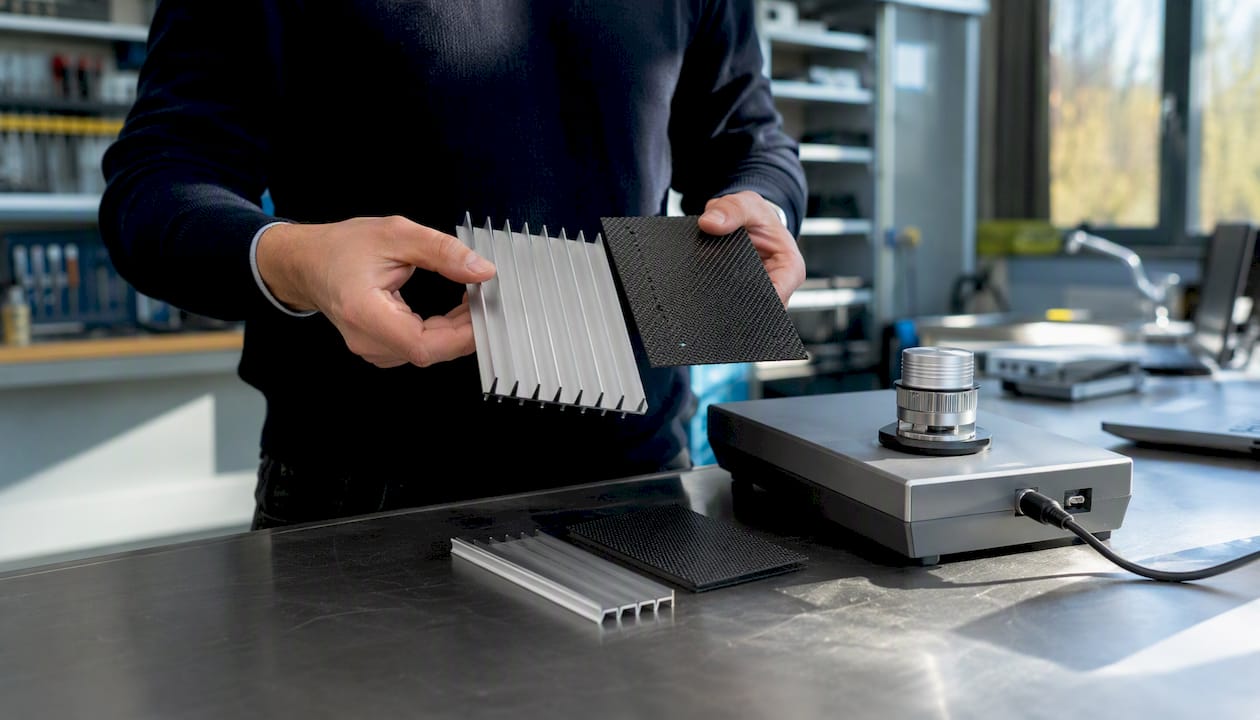
Heat sink material trade-offs: Choosing between copper, aluminum, and a carbon-fiber composite for a heat sink involves trading off conductivity, weight, and cost. Running those candidates through the toolkit’s conduction workflow with actual temperature-dependent properties gives a simulation-validated ranking in minutes. For more context on heat-transfer applications that exercise this kind of workflow, the heat transfer engineering reference on the Jewlztech site covers the relevant cases.
Honest limitations: The Thermalysis Toolkit is focused on thermal workflows. It is not a PLM-scale materials management platform, does not offer Ashby-chart trade-off visualization, and does not include global standards cross-referencing. Teams that need those capabilities alongside thermal simulation will use it in combination with a broader tool like Total Materia or Ansys Granta.
Pro Tip: During your trial, run a transient conduction case using a material from your current project. If the toolkit’s property data matches your design spec and the export drops cleanly into your FEA model, that is the validation you need.
Feature | Thermalysis Toolkit capability |
Temperature-dependent properties | Yes, across full operating range |
Heat transfer modes | Conduction, convection, radiation |
Simulation export | Excel-native, FEA-compatible |
Pricing | Monthly subscription; free tools available |
Platform | Downloadable Excel-based toolkit |
When a focused thermal toolkit beats a broad materials platform
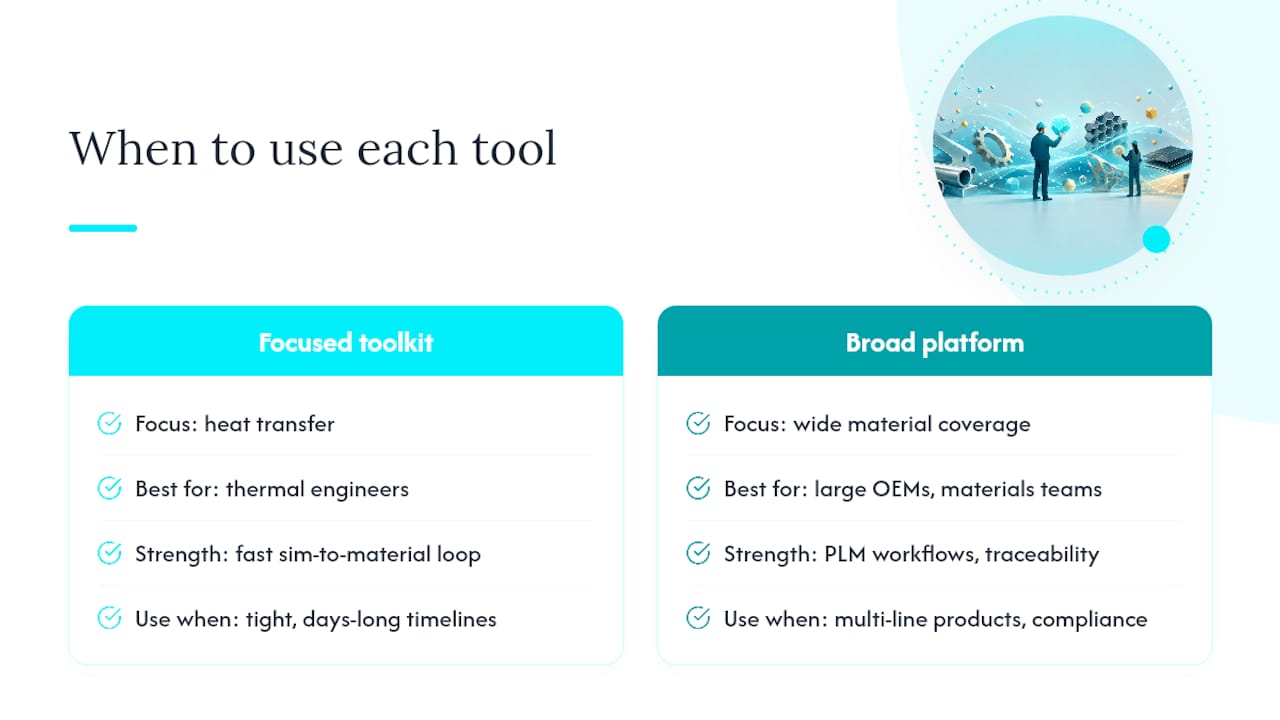
The conventional wisdom in engineering software procurement is that more database coverage equals more value. Spend enough on a platform, get access to every material class, every standard, every Ashby chart. That logic makes sense for a large OEM with a dedicated materials team running PLM-scale workflows. For most product engineers and thermal specialists, it is the wrong trade-off.
A broad platform gives you options. A focused toolkit gives you answers. When your constraint is heat transfer, and your timeline is measured in days rather than quarters, the ability to pull temperature-dependent conductivity curves and run a conduction simulation in the same session is worth more than access to 570,000 materials you will never evaluate.
The signs your project belongs in a focused thermal toolkit: you are working under tight timelines, heat-transfer constraints are driving material selection rather than mechanical properties, and you need simulation-validated choices fast. The signs you should escalate to a PLM-scale tool: your organization manages materials across multiple product lines, you need global standards equivalence for regulatory compliance, or your selection feeds into a formal PLM system with traceability requirements.
Most thermal engineers do not need to choose one permanently. The Thermalysis Toolkit handles the simulation-to-material loop efficiently; Total Materia or Ansys Granta handles the standards and enterprise layer. Using both is not redundant. It is the right tool for each job.
The Jewlz Thermalysis Toolkit is ready to run your next thermal case
If your material decisions are driven by heat-transfer constraints, the Thermalysis Toolkit gives you temperature-dependent property data and simulation-ready exports in a single, compact tool. No enterprise contract, no months-long onboarding, no separate database subscription to manage alongside your FEA environment.
Start with a transient conduction case or a heat sink material comparison using a real part from your current project. The toolkit’s built-in property database covers the material classes thermal engineers work with most, and the Excel-based format means your first simulation run is the same day you download it. Visit the Thermalysis Toolkit product page to review subscription options and get started.
Recommended
Comments